How to use FAB CRM to capture leads from Website FormTo use FAB CRM to integrate with your website, there are 2 best options. First is AI prompt, In modern world, you can instruct AI coder be it co-pilot, loveable, google AI studio, replit etc To connect the contact form or lead magnet form to connect with FAB CRM you can use following prompt. Second is more traditional approach, where if you know coding or you have developer who can code and use the provided code snippet to handle the for submission. Well, in both cases you need to bind the api to correct workspace. you can refer to steps below to get your workspace id after you signup to https://cs.fabbuilder.com 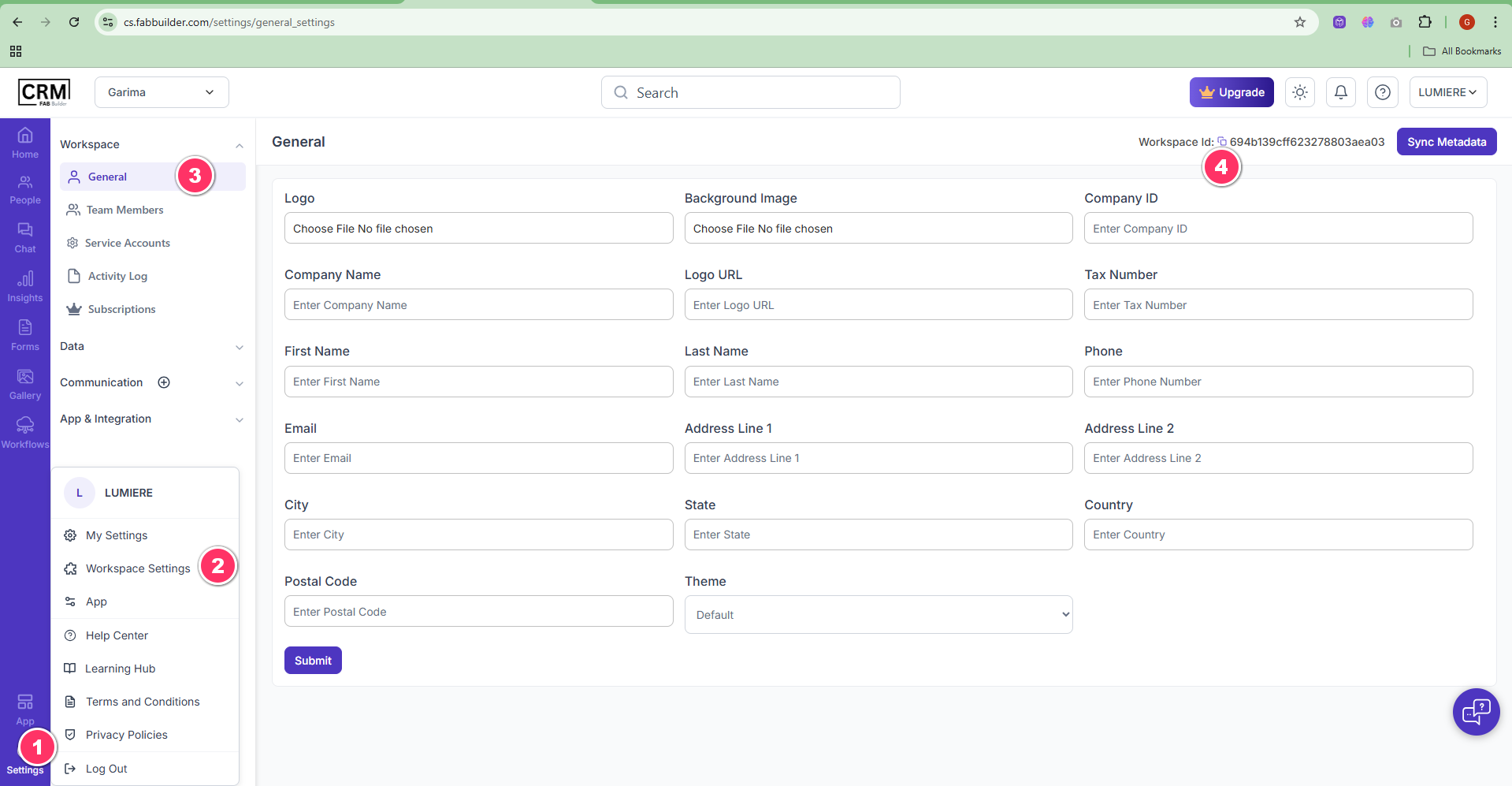 Solution 1) Prompt for AI coding platformsOn contact-us form or lead form submitted, post the data to api: " https://cs.fabbuilder.com/api/tenant/<Workspace ID>/lead " and body data would be a json looks like: {data: {companyName:{companyName},lookingFor:{message},email:{email},firstName:{firstName},lastName:{lastName},phone:{phone},source=website}} Solution 2) Traditional Code Snippet for API integrationCode Snippet is as below const { name, email, company, phone, message, customerId, type } = formData; const fullDescription = `[${type}] ${details}`; const url = "https://cs.fabbuilder.com/api/tenant/<WORKSPACE ID>/lead"; // <<- Need to update Workspace ID const payload = { data: { firstName: name, lastName: "", email: email, phone: phone, companyName: company, description: message, customerId: customerId, source: 'website', } }; try { const response = await fetch(url, { method: 'POST', headers: { 'Content-Type': 'application/json', 'Accept': 'application/json' }, body: JSON.stringify(payload) }); if (response.ok) { setStatus('success'); setFormData({ name: '', email: '', company: '', phone: '', type: 'iGaming Solutions (PMS/GMS)', details: '' }); } else { setStatus('error'); } } catch (error) { console.error('Submission error:', error); setStatus('error'); } }; |