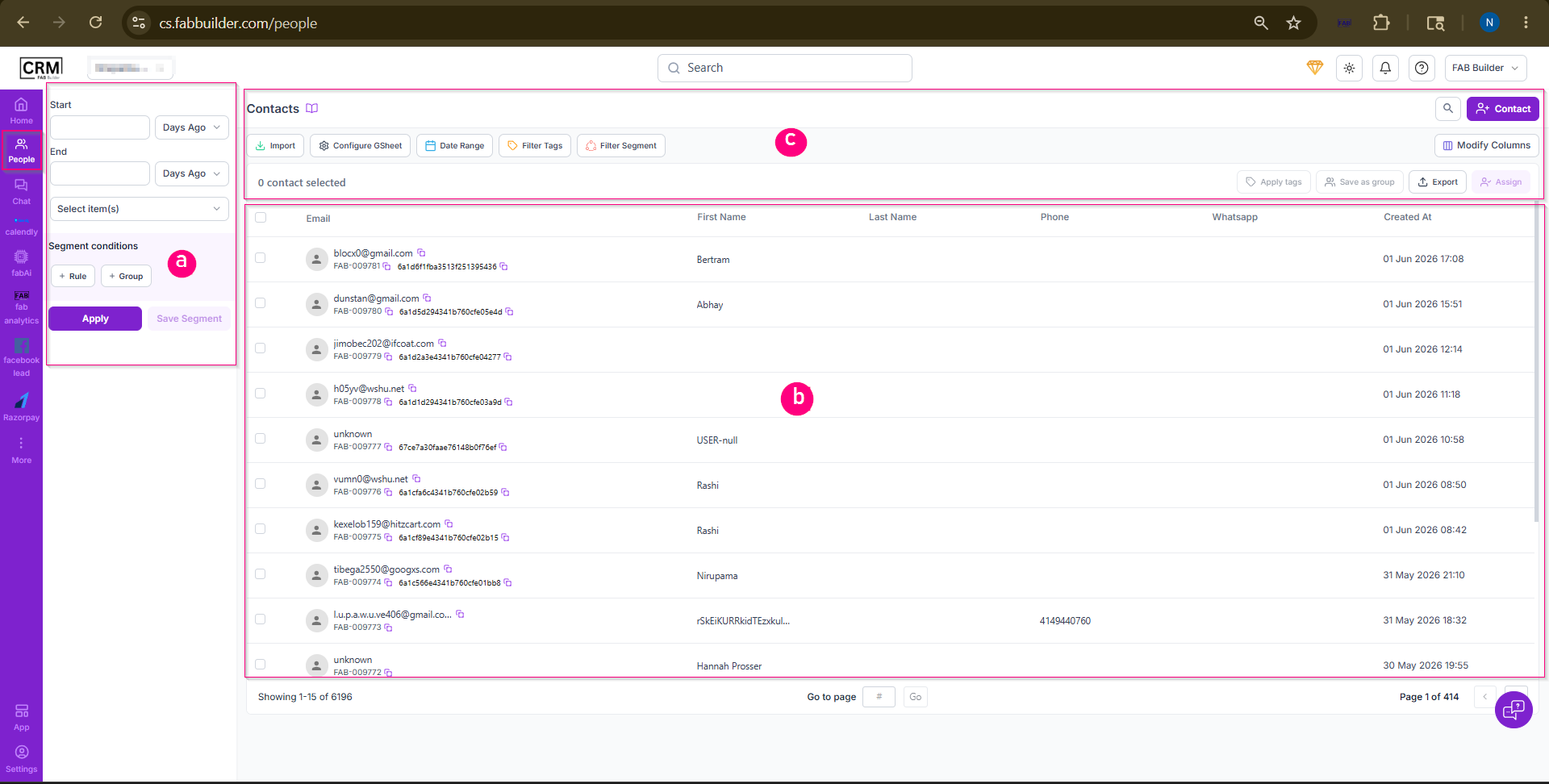
The screen is broadly divided into three main sections:
1. Segment Builder Panel
Purpose:
The Segment Builder Panel helps users create targeted customer segments by applying specific filtering criteria. Segments can be used to organize contacts and identify a specific audience for communication and marketing activities.
Available Options:
- Start / End – Select a date range for filtering contacts.
- Select Item(s) – Choose the contact field to be filtered.
- Rule – Define filtering conditions.
- Group – Combine multiple rules into a single segment.
- Apply – Apply the selected filter criteria.
- Save Segment – Save the segment for future use.
2. Contact List
Purpose:
The Contact List displays all contacts and leads available in the CRM. It provides a consolidated view of customer information and allows users to review, search, and select contacts for further actions.
Information Displayed:
- Email Address
- Contact ID
- First Name
- Last Name
- Phone Number
- WhatsApp Number
- Created Date
Users can select one or multiple contacts for performing bulk actions.
3. Contact Management Toolbar
Purpose:
The Contact Management Toolbar provides quick access to contact management and administrative actions.
Available Actions:
- Add contact – Addcontacts into the CRM.
- Import– Import contacts into the CRM.
- Configure GSheet – Configure Google Sheets integration.
- Date Range Filter – Filter contacts based on creation date.
- Filter Tags – Display contacts associated with selected tags.
- Filter Segment – Display contacts belonging to a specific segment.
- Modify Columns – Customize the columns displayed in the contact list.
- Export – Export contact information.
- Assign – Assign selected contacts to users or team members.
- Apply Tags – Apply tags to selected contacts for better organization.