CommunicationThis section of comminication allow users to configure different ways of communicating with customers. A channel can be a direct communication medium (such as WhatsApp or Call Log) or a third-party service provider (such as SMTP or Brevo) that enables email or messaging delivery.
NavigationNavigate to App/Settings → Communication from the left-side menu. This opens the Communication Channels screen, where users can view, search, filter, and manage communication channels. Screen ComponentsA. Communication Channels HeaderDisplays the page title, Communication Channels, indicating the current module being accessed. B. Information BannerProvides an overview of communication channel management and includes options to:
C. Search ChannelAllows users to search for a specific communication channel by entering the channel name in the search field. D. Add Channel ButtonEnables users to create and configure a new communication channel. E. Channel Type FilterThe All Channels dropdown allows users to filter the displayed channels based on channel type. F. Status FilterThe All Status dropdown allows users to filter channels according to their status, such as Active or Inactive. G. Channel Listing SectionDisplays all configured communication channels in a card-based layout. Each card shows the channel name, channel type, and current status, allowing users to review and manage available communication channels efficiently.
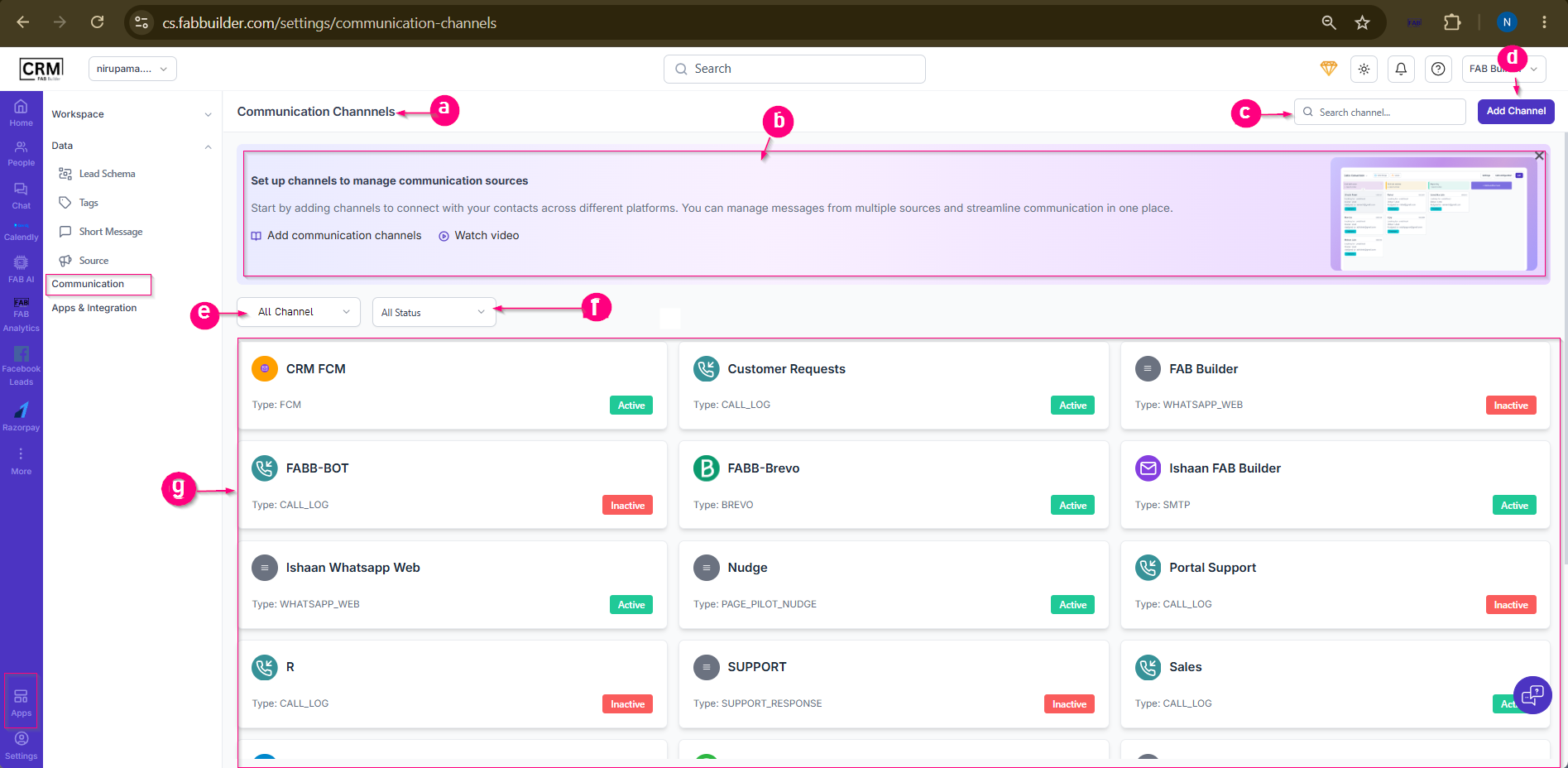 Screen- Communication Channel |