FAB Customer Experience

GuideDocs
k
FAB CRM Introduction
Getting Started
Dashboard
Home
People
Chat
Funnel
Insight Module
Forms
Gallery
Workflows
My Settings
Data
Communication
App Integeration
References

Build by FAB Builder. The source code is available on GitHub.

ContactSponsor

Translate

Choose language

Select your preferred language for this documentation.


Update My Account Settings

Prerequisites

  • User must be logged in to the CRM.

  • User must have access to the Settings module.

  • A valid user profile must exist.

Steps

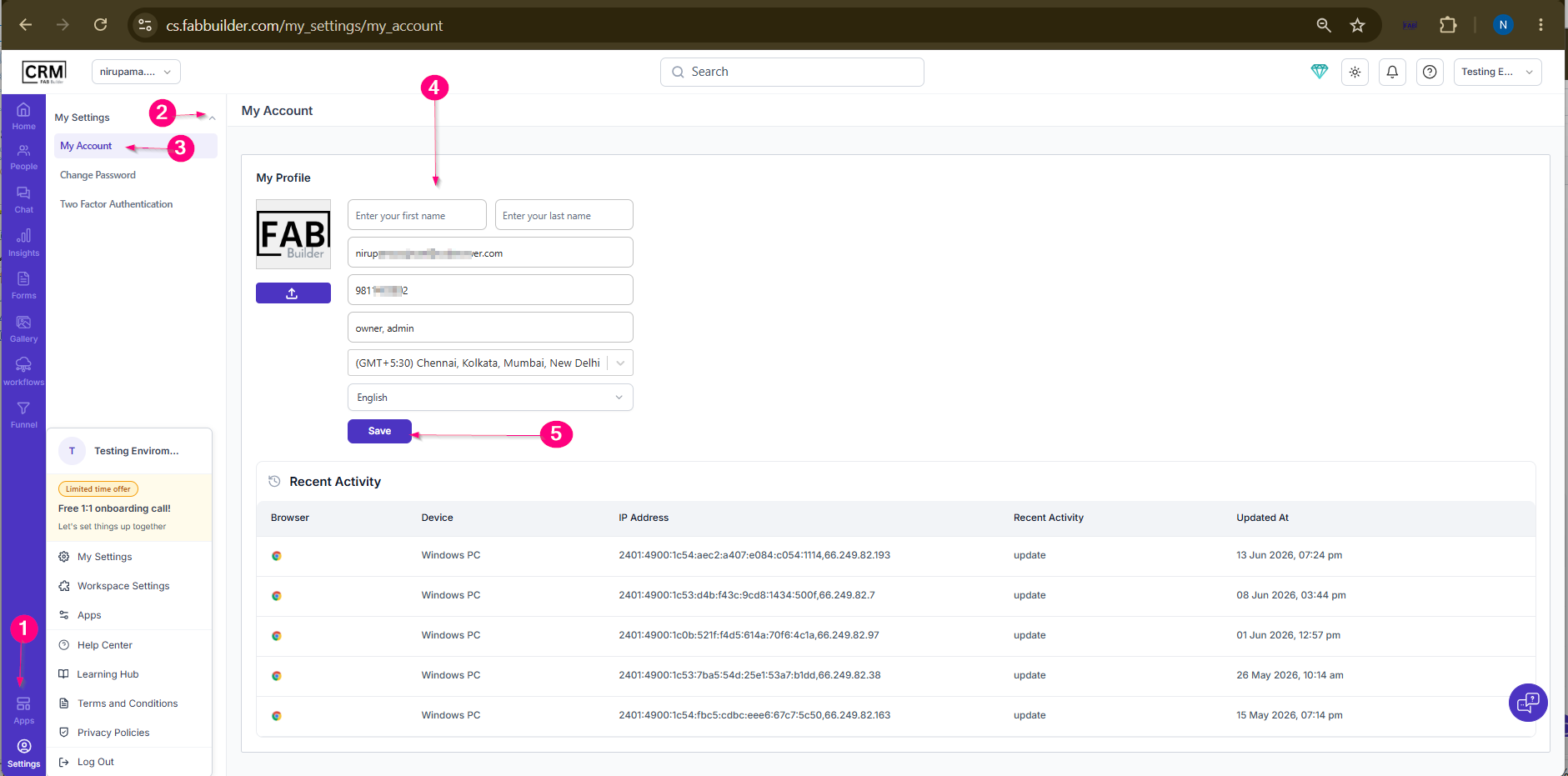
  1. Go to Settings from the left navigation menu.

  2. Select My Settings.

  3. Click on the My Account tab.

  4. Update the required profile information:

    • First Name

    • Last Name

    • Mobile Number

    • Time Zone

    • Language Preference

    • (Optional) Upload or change the profile picture.

  5. Click Save.

Result

The profile information and account preferences are updated successfully and reflected in the user account.
Sample product