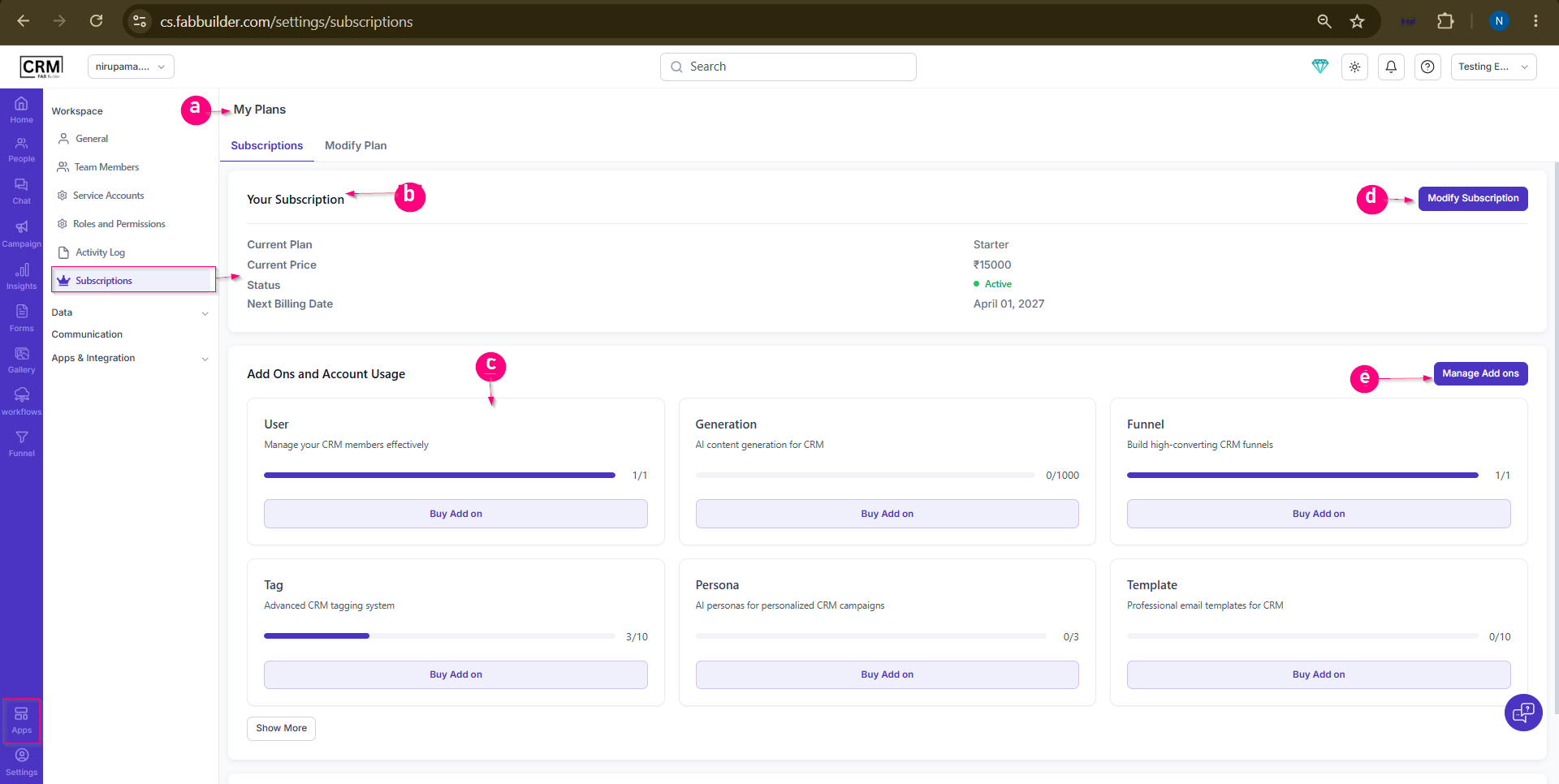
Subscriptions ScreenAccess Subscription ScreenSettings → Workspace → Subscriptions Alternative: Click the Diamond icon in the header to access subscription and plan details. PurposeThe Subscriptions screen allows users to view their current subscription plan, billing information, feature usage, and available add-ons. It also provides options to purchase add-ons, manage existing add-ons, and modify the current subscription plan. Screen Components
a.My Plan Screen
Provides an overview of the current subscription plan, feature usage, add-ons, and subscription management options.
b. Subscription DetailsDisplays information about the active subscription, including:
b. Usage SummaryDisplays the usage and limits of features available under the current subscription plan. Usage indicators help users monitor consumption and understand how much of their plan allocation has been utilized. Buy Add-on in this section allows users to purchase additional capacity, credits, users, or premium features beyond the current plan limits.d. Modify Subscription PlanAllows users to upgrade, downgrade, or switch to a different subscription plan.
e. Manage Add-onsAllows users to view, modify, or manage purchased add-ons associated with the subscription.
User Actions
 |