The Edit User screen is used to manage and update a team member’s profile, roles, access permissions, targets, and activity details within the CRM.
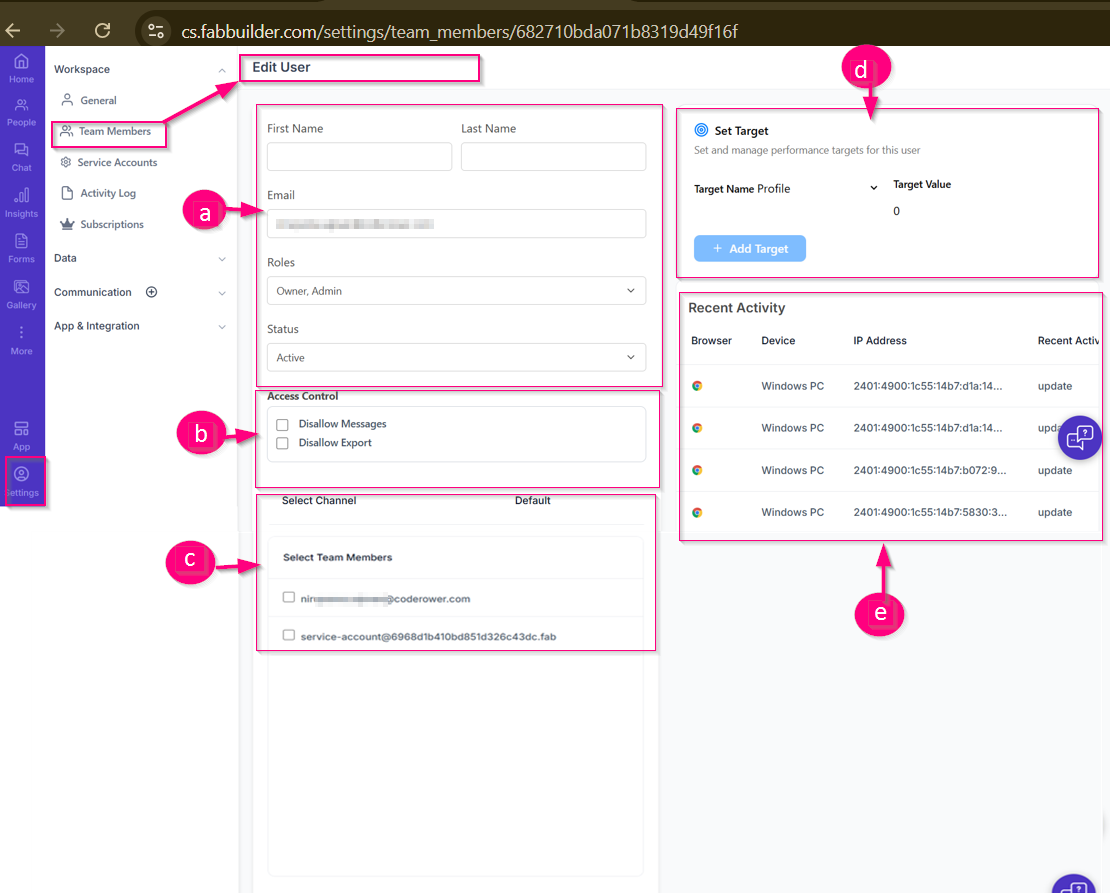
User can access from the left navigation sidebar, go to Settings →Workspace →Team Members
Select a team member and click Edit button on team member screen
Screen Details
a. User Details-This section allows you to view or update basic user information such as First NameLast Name,Email (read-only),Roles (e.g., Owner, Admin),Status (Active / Inactive).
b. Access Control
Controls what actions the user is allowed to perform:
- Disallow Messages – Restricts the user from sending messages
- Disallow Export – Prevents the user from exporting data
c. Channel & Team Selection
- Select Channel – Assigns the default communication channel for the user
- Select Team Members – Links this user with other team members or service accounts for collaboration
d. Set Target
Use this section to assign user performance targets by selecting a target profile, entering a target value, and clicking Add Target.
e. Recent Activity
Displays the latest login and activity information of the user, including:
Browser,Device,IP Address,Recent actions performed