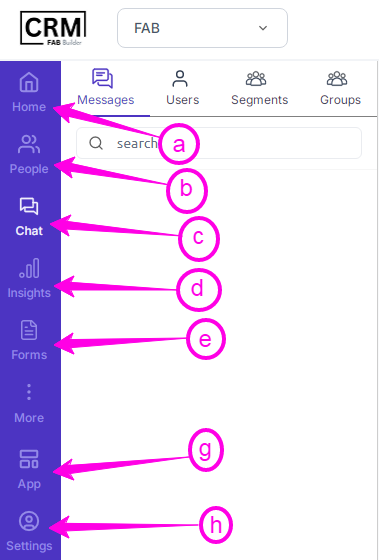
These are small, interactive icons used on the home page of the CRM platform on the left-hand sidebar (blue in color). These icons display specific information and quick access to the CRM system automation settings.
A few modules are customized and can be added, removed, or rearranged by users.
a. People – View and manage all users or contacts within the CRM system.
b. Chat – Access and manage all chat conversations and communication threads.
c. Lead Funnels – This visual representation helps the business owners to track and interact with potential customers and leads.
d. Insights – This helps the business to track, manage, and analyze customer interaction and performance.
e Forms – Design and manage data collection forms for lead capture or surveys.
f. Gallery – Store and manage media files such as images, videos, or documents.
g. Workflow – Build and automate business workflows or sequences.
h. App Integration – Connect and manage third-party applications (e.g., Brevo) and integrations.
i. My Profile – Shows all personal details (email ID) of the business user who can change their setting by clicking the tab.