FAB Customer Experience

GuideDocs
k
FAB CRM Introduction
Getting Started
Dashboard
Home
People
Chat
Funnel
Insight Module
Forms
Gallery
Workflows
My Settings
Data
Communication
App Integeration
References

Build by FAB Builder. The source code is available on GitHub.

ContactSponsor

Translate

Choose language

Select your preferred language for this documentation.

Enable or Disable an App

Prerequisites

  • The application should be properly installed and configured in the CRM system.
  • The user should have the required access and permissions.

Steps to Enable or Disable an App

  1. After successful login, go to the App module section. This action opens a panel listing Apps and Integrations.
  2. Select App. The right-side panel displays all installed or configured applications within the CRM system.
  3. Locate the required application and click the Enable/Disable toggle button available on the right-hand side of the application card.

The application will be enabled or disabled based on the selected action.
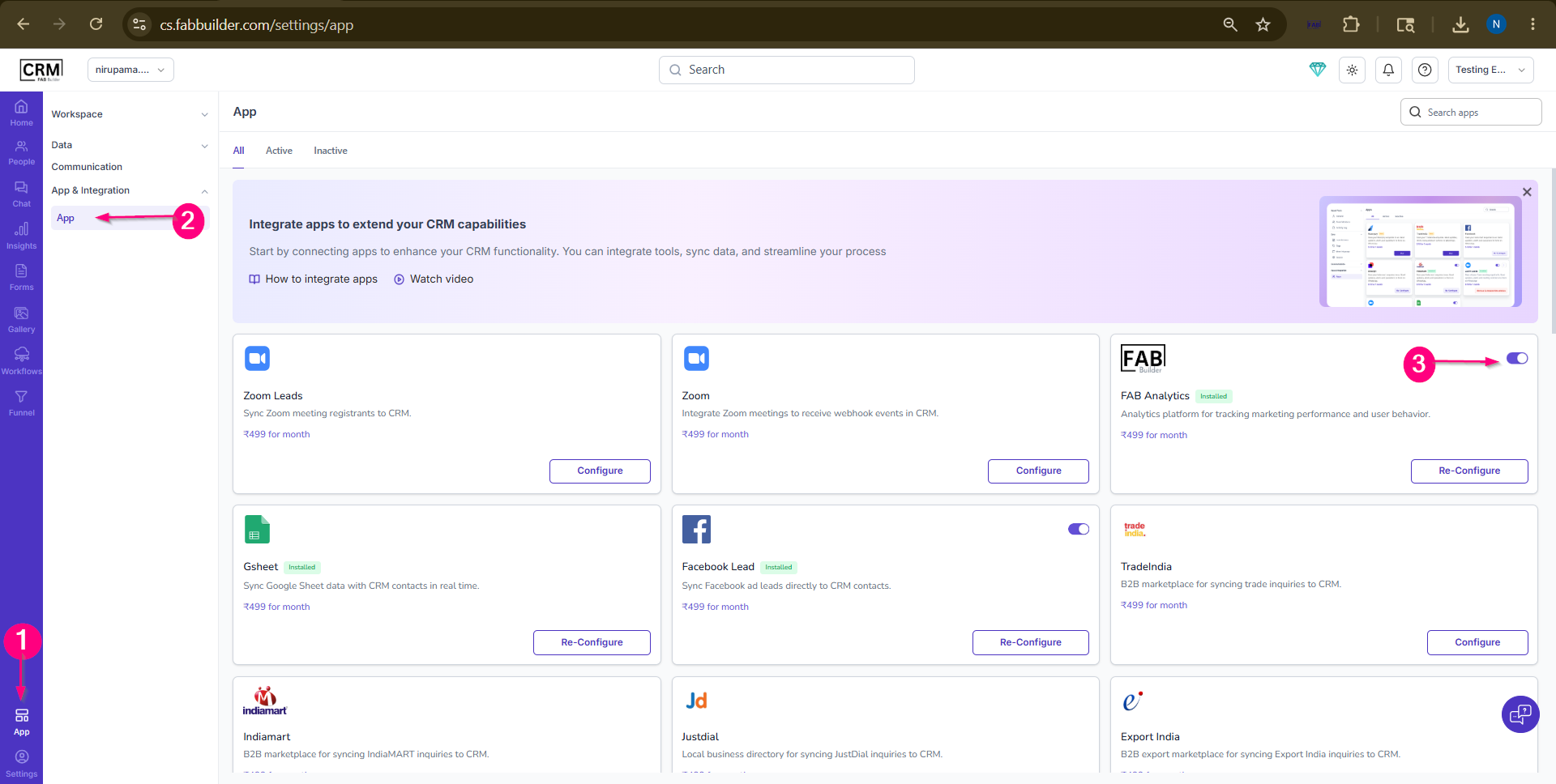
Sample product
Screen- Enable/Disable App