Lusha integration enables users to capture and enrich lead data by fetching verified contact details such as email, phone number, company, and job role into the CRM.
This integration helps improve lead quality, reduces manual effort, and increases conversion efficiency.
Prerequisites
Before configuring the integration, the user should ensure the following:
An active Lusha account is available
· API access is enabled in the Lusha plan
· The Lusha API Key is generated
· User has access to CRM (cs.fabbuilder.com)
· Required permissions to configure integrations are granted
How It Works
Before using the integration, it is important to understand the workflow.
· The user selects a lead in the CRM
· Clicks on Lusha in the Enrichment section
· The system sends a request to Lusha via API
· Lusha returns available contact data
· CRM automatically updates the lead fields
Flow:
Lead Selected → Click Lusha → Data Fetched → Lead Updated
Lusha Configuration
Steps to Configure Lusha Account
Before configuring the CRM, the user should first retrieve the API key from the Lusha platform.
- Login to your Lusha account
- Navigate to Settings / API section
- Generate or copy the API Key
- Keep the API Key ready for CRM configuration
CRM Configuration
Steps to Configure Lusha in CRM
Before starting the configuration, the user should log into https://cs.fabbuilder.com/ the and navigate to the integration section.
- Navigate to:App → App & Integration → App
- Search and select Lusha
- Click on Configure
- Enter the following details:
- Name: Lusha
- API Key: Paste your Lusha API Key
5.Click on Save.
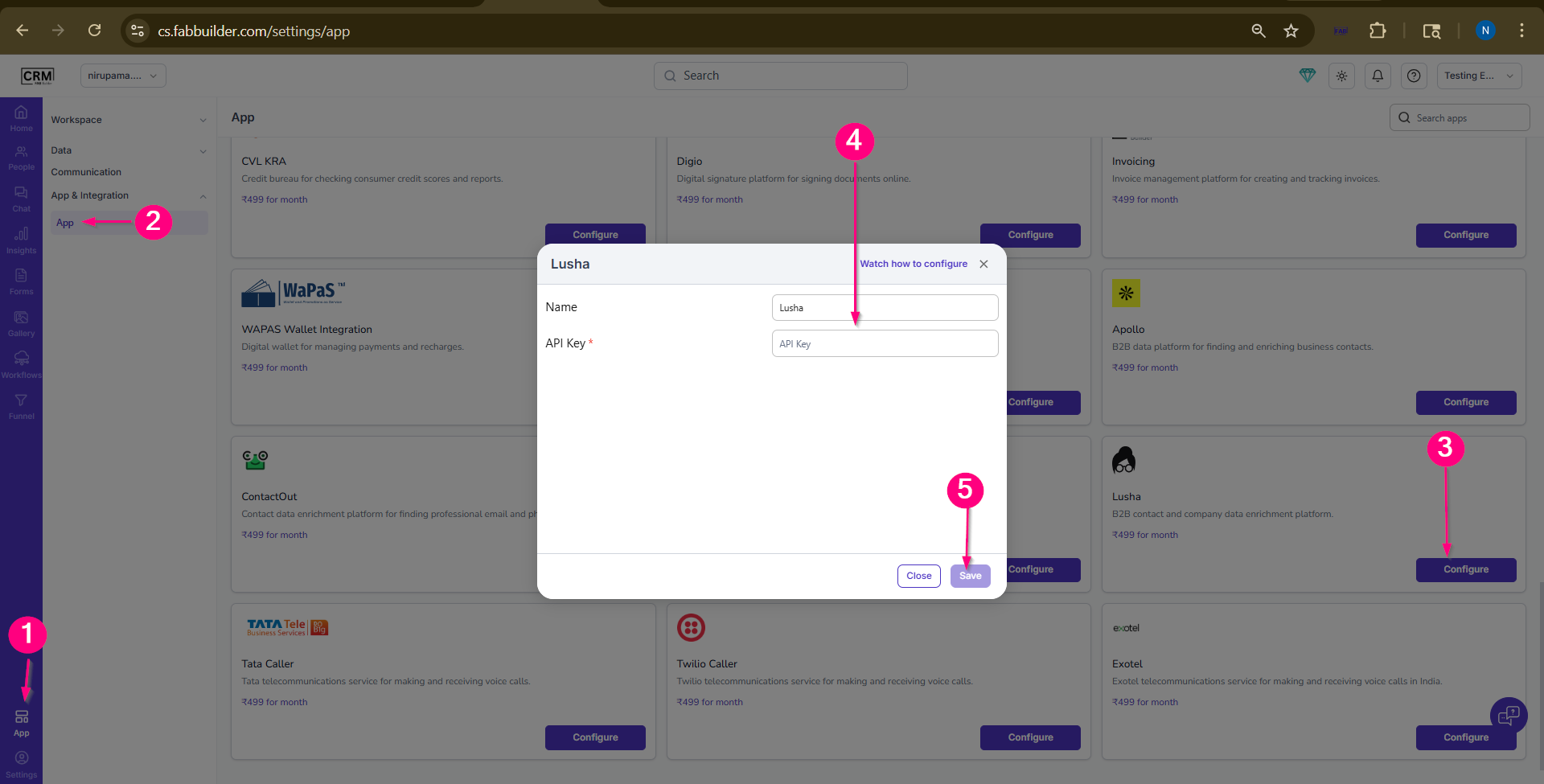
Screen- Configuration steps of Lusha App
6.Once app is configured,click on enable button.
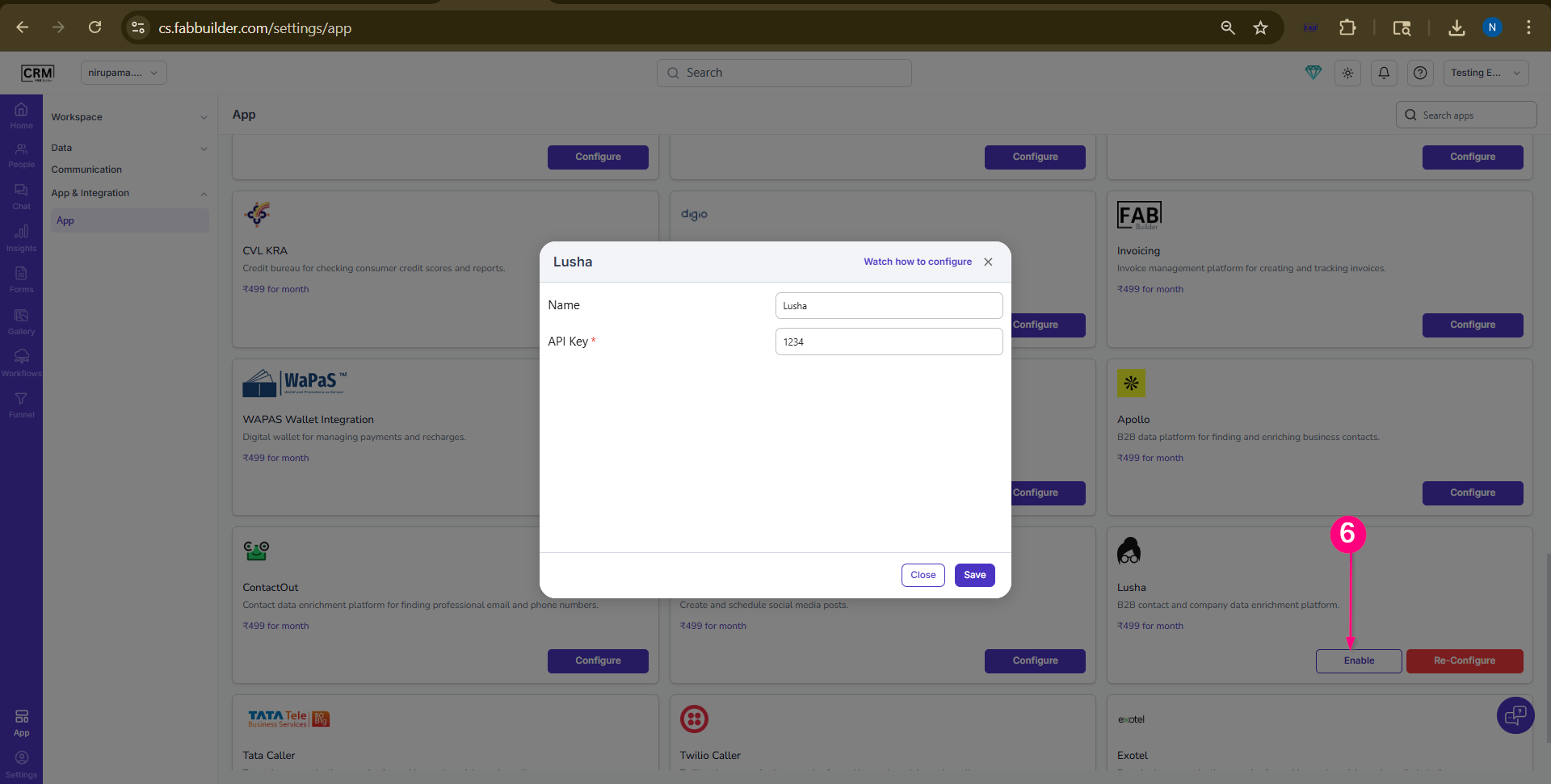
Screen- Enable the Lusha App
After enabling the app under Communication Channels, users can enrich lead data Refer to the “Enrich Lead Data” section for more details.
Enrich data by Lusha
Steps to Enrich Lead Data using Lusha
- Ensure the Lusha app is enabled under Communication Channels.
- Navigate to the Chat screen in the CRM.
- Select the desired lead/contact from the chat list.
- Upon selecting the contact, the right-side panel will expand.
- In the panel, navigate to the Enrich tab.
- Click on Lusha from the available list of apps.
- The system will fetch and update the lead data. The updated details can be viewed in the corresponding columns such as Email, Phone Number, Company, and Designation in the CRM.
Verification
After completing the configuration, the user should verify whether the integration is successfully established.
- Ensure the configuration is saved without errors
- No validation or API error should appear
- Integration should be active and ready to use
Functionality After Integration
Once the integration is successfully configured, the user can perform the following actions:
- Enrich existing leads with additional details
- Fetch verified email and phone numbers
- Update incomplete lead records
- Improve lead quality for outreach