Overview
Tata Caller integration enables users to make and manage calls directly from the CRM. This integration helps improve communication efficiency, track call activities, and maintain proper records for follow-up.
Prerequisites
Before configuring the integration, the user should ensure the following requirements are met:
• Active Tata Caller account
• API access enabled
• API Key generated
• Valid business or virtual phone number configured
• CRM access (cs.fabbuilder.com)
• Required permissions
How It Works (User Flow)
Before using the integration, it is important to understand how the calling process works within the CRM:
1. Select a lead/contact from CRM
2. Click on Call option
3. System sends request to Tata Caller
4. Call is initiated using configured number
5. Call activity is logged in CRM.
Tata Caller Configuration
Before configuring the CRM, the user should first obtain the required API credentials from the Tata Caller platform:
1. Login to Tata Caller account
2. Navigate to API/Integration section
3. Generate or copy API Key
4. Keep API Key ready for CRM
CRM Configuration
Before starting the configuration, the user should log into https://cs.fabbuilder.com/and navigate to the integration section:
- Navigate to App
- go to workspace→ App & Integration → App
- Search for Tata Caller.Click Configure
- Enter Name and API Key
- Click Save
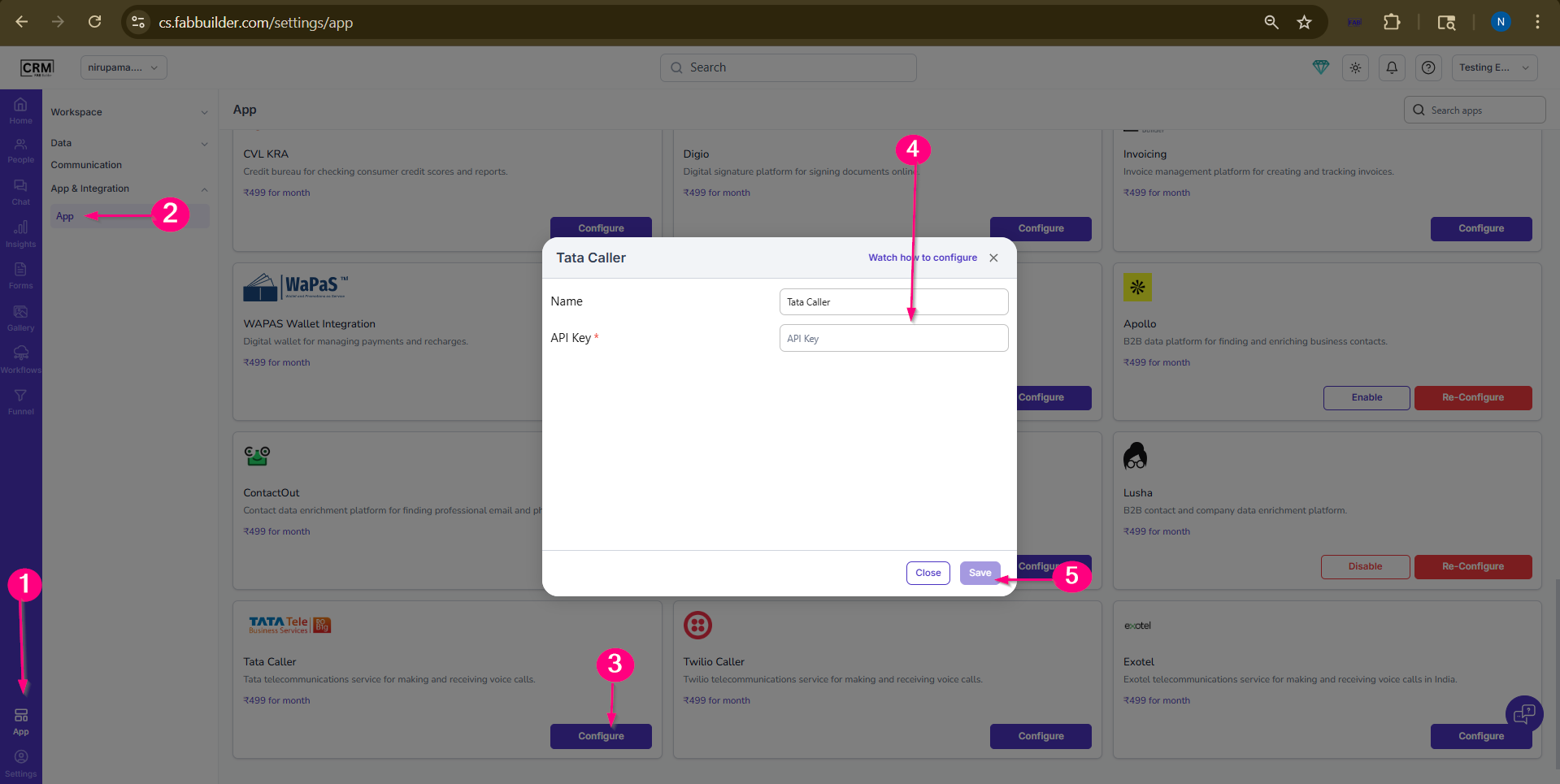
Screen- Configuration Steps of Tata Tele(Tata Caller)
Verification
After completing the configuration, the user should verify that the integration is working correctly:
Ensure configuration is saved successfully and no errors appear. Calling functionality should be active.
Functionality After Integration
Once the integration is successfully configured, the user can perform the following actions:
• Make calls directly from CRM
• Track call activities
• Log call details against leads/contacts
• Improve follow-up process