FAB Customer Experience

GuideDocs
k
FAB CRM Introduction
Getting Started
Dashboard
Home
People
Chat
Funnel
Insight Module
Forms
Gallery
Workflows
My Settings
Data
Communication
App Integeration
References

Build by FAB Builder. The source code is available on GitHub.

ContactSponsor

Translate

Choose language

Select your preferred language for this documentation.


App Module

The App  is used to configure and manage third-party applications and integrations within the CRM. These integrations help users connect external services, automate business processes, and synchronize data with the CRM.
Sample product

App Screen

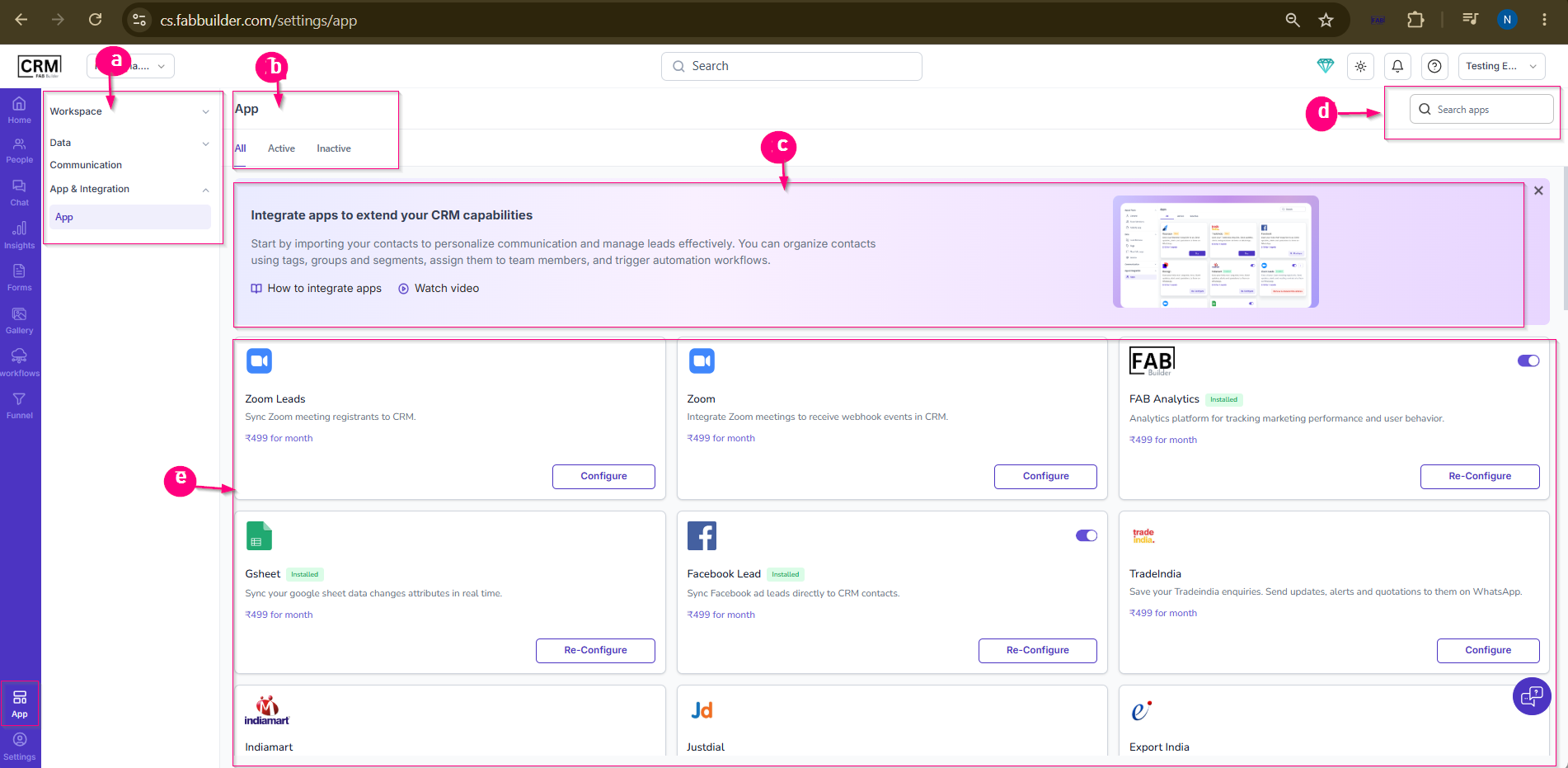
The App screen is used to configure and manage third-party applications and integrations within the CRM. These integrations help users connect external services, automate business processes, and synchronize data with the CRM.

Screen Components

a. Configuration Menu Panel
The left-side panel contains the main configuration categories:

  • Workspace – Manage workspace-related settings.

  • Data – Configure data management settings.

  • Communication – Manage communication channel settings.

  • App & Integration – Access application and integration settings.

When App & Integration is selected, the App sub-tab opens by default and displays all available applications and integrations.

b. App Categories
Applications can be filtered using the following tabs:

  • All – Displays all available applications.

  • Active – Displays applications that are currently enabled.

  • Inactive – Displays applications that are currently disabled.

c. Information Panel
Displays an overview of the App section and provides quick access to support resources such as:

  • How to Integrate Apps

  • Watch Video

d. Search Bar
Allows users to search for a specific application or integration.

e. Application Listing Section
Displays available applications in card format. Each application card provides:

  • Application Name

  • Brief Description

  • Installation Status

  • Subscription Information (if applicable)

  • Configure / Re-Configure option to set up a new integration or modify an existing configuration.

  • Enable / Disable option to activate or deactivate the application.

Purpose of the Screen

The App screen enables users to integrate external applications and services with the CRM. These integrations help streamline operations, automate lead capture, synchronize data, and improve communication across different business platforms.