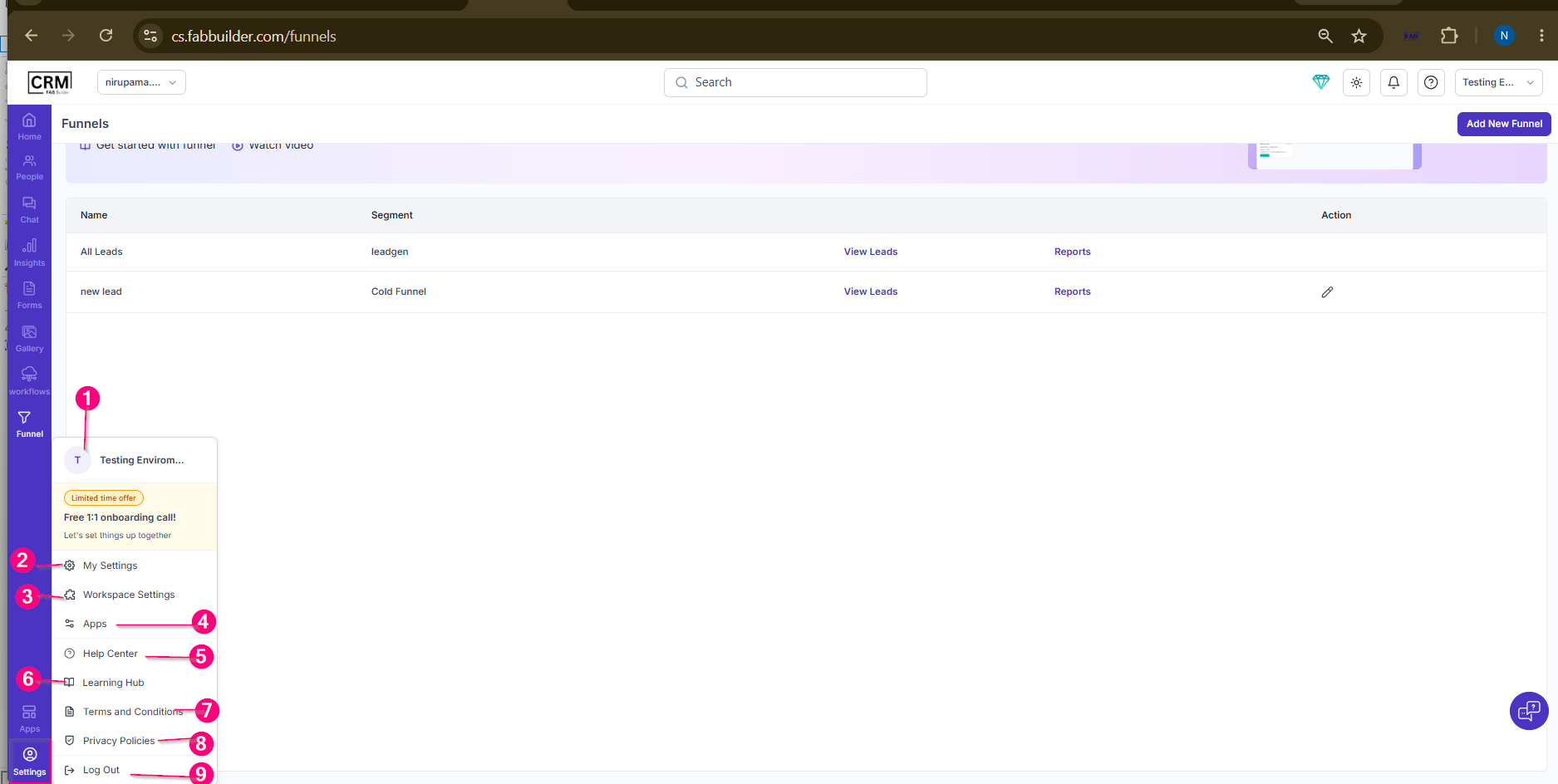
SettingsPurposeThis section provides access to account management, workspace configurations, application settings, support resources, and account-related options. It allows users to manage personal preferences, workspace settings, security options, and platform resources from a single location. Menu Components1. Current WorkspaceDisplays the currently active workspace (e.g., Testing Environment). Users can identify the workspace they are working in and switch to another workspace if multiple workspaces are available. 2. My SettingsProvides access to personal account and security settings, including:
3. Workspace SettingsAllows users to manage workspace-level configurations, permissions, communication settings, integrations, and other administrative options. 4. AppsProvides access to installed applications, connected services, and available integrations within the CRM. 5. Help CenterProvides access to user guides, documentation, FAQs, and support-related resources. 6. Learning HubProvides training materials, tutorials, onboarding content, and learning resources to help users understand and use the platform effectively. 7. Terms and ConditionsDisplays the platform's terms of use, service agreements, and legal information. 8. Privacy PoliciesDisplays information regarding data privacy, security practices, and the handling of user information. 9. Log OutAllows users to securely sign out of the CRM application. NoteThe Settings menu acts as a centralized location for managing account preferences, workspace settings, applications, security configurations, and support resources.
 Screen- Setting |